JW Library
- 4.8
- Rating
- 50.00M
- Installs
- Free
- Price

 Analysis by App-foxy
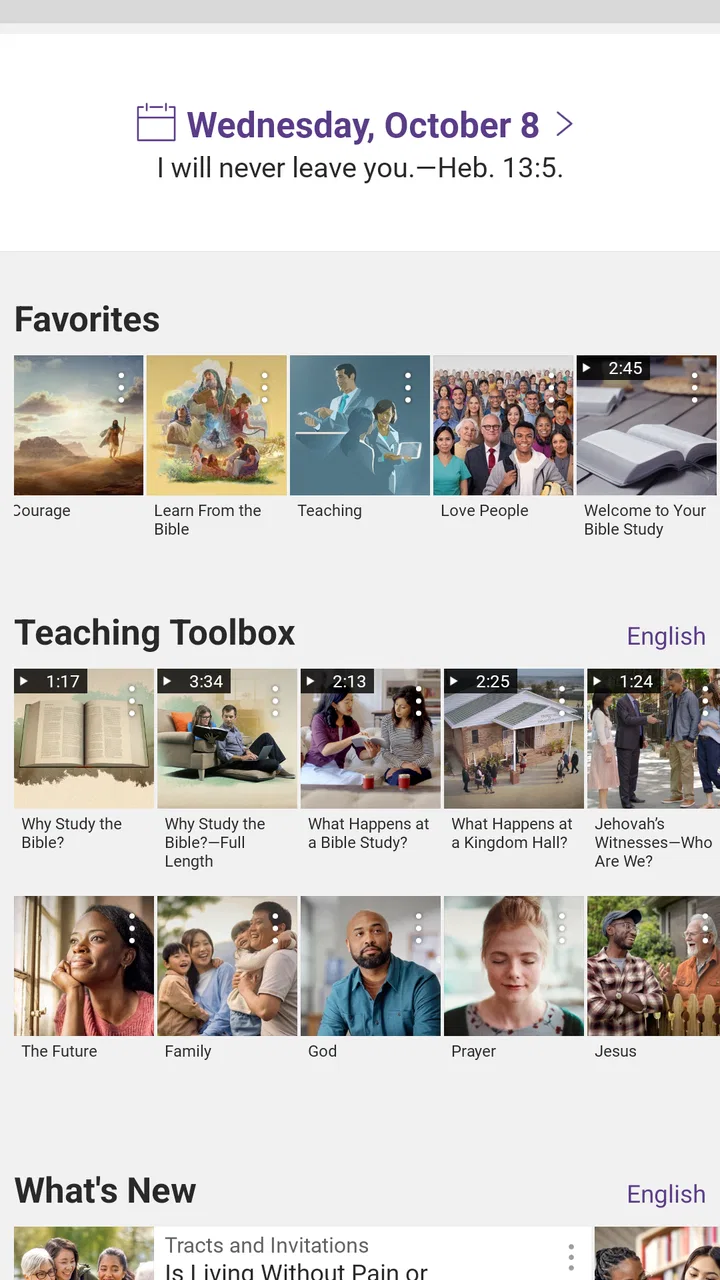
When I first opened JW Library, I expected a straightforward Bible-reading app. It is that, but it also feels more like a compact reference shelf for people who want to read, study, listen to, and revisit religious material from one place. The app is developed by Jehovah's Witnesses, belongs to the Books & Reference category, and is free to use with an Everyone content rating. That combination makes it easy to try, although the amount of material can make the first few minutes feel less obvious than the simple store summary suggests.
My overall impression is that this is a focused tool rather than a general-purpose ebook reader. Its strongest point is the way Bible reading and related study material sit together. Instead of switching between a Bible app, a document reader, and a separate audio service, I can keep my reading session in one environment. That is especially useful when I am following a passage, checking connected material, and then returning to the text without losing the thread.
The app has been available since July 3, 2013, and its reach is substantial: it has passed 50 million installs and holds a 4.8 average from around 1.7 million ratings. Those figures do not replace personal testing, but they do explain why JW Library is familiar to so many readers. It supports content in over 1,000 languages, which is a meaningful advantage for multilingual households, congregations, language learners, and anyone who prefers reading scripture in a language other than the phone's main language.
You May Also Like

 AccuWeather: Weather Radar
AccuWeather Review: A Quick, Clear Forecast for Everyday Decisions
For everyday plans, the best forecast is the one you can understand quickly. AccuWeather makes rain timing, radar, and local conditions easy to act on, with a few trade-offs.

 Hill Climb Racing
Why Hill Climb Racing Still Turns Crashes Into One More Run
A tiny car, a bumpy hill and one more upgrade: Hill Climb Racing keeps resurfacing because its simple chaos makes every near-miss feel personal.

 AliExpress - Shopping App
AliExpress Makes Global Shopping Feel Personal, but Shoppers Bear the Risk
AliExpress turns a global marketplace into a pocket-sized discovery engine. Its reach is useful, its shopping loop compelling, and its trade-offs easy to miss.

 Lords Mobile: Kingdom Wars
Lords Mobile Is a Kingdom-Building Routine, Not a Quick Match
A case-by-case verdict on the building, battles, device demands, and social commitments that make Lords Mobile rewarding for some players and exhausting for others.

 PDF Scanner app - TapScanner
TapScanner Makes Paperwork Easier to Capture, Check, and Share
TapScanner makes scanning with a phone feel less like a rescue operation and more like a dependable step in getting work done. Its capture tools are useful, though not flawless.

 Block Blast!
Block Blast! Shows How Much a Puzzle Game Can Leave Out
A quiet grid game shows why puzzle players increasingly value instant clarity, repeatable skill and low-pressure play—and where the genre still needs to catch up.
More From Our News Desk
View All News


Getting past the first points of friction
The first place users can get stuck is not necessarily a technical failure. It is often a question of orientation. A large library invites browsing, but browsing without a plan can turn a simple reading session into repeated opening and closing of menus. I found it more comfortable to decide what I wanted before exploring: a particular Bible book, a study subject, an audio item, or material in another language.
Language selection deserves attention early. Since the app covers such a wide range of languages, the useful choice is not always the one that matches the phone's system language. A person may want the interface in one language and the reading material in another, or may need to download content for someone in the same household. I would check the language area deliberately rather than assuming every available item is already ready for offline use.
That distinction matters because a title appearing in the library does not necessarily mean every part of it is stored locally. If I am preparing for a trip, a meeting, or a place with unreliable connectivity, I would open the material while connected and make sure the needed content is available before leaving. This is one of the most useful setup habits with a library-based app: prepare the exact reading list instead of trusting that the whole collection will be instantly accessible.
Another common sticking point is expecting the app to behave like a single long book. JW Library is better understood as a collection of texts and study resources. Moving between those resources can be productive, but it requires a little patience while learning where the current item, related material, and saved reading path are located. I would spend a few minutes tapping through the reading screen before starting a serious study session, especially if I planned to use audio or switch languages.
A calmer setup routine
My preferred setup is simple. I first choose the main Bible language, then identify the material I expect to use regularly, and only afterward explore additional languages or publications. This keeps the initial library manageable. When I am testing a new device, I also open the important items one by one instead of downloading everything at once. That approach makes it easier to notice which resource is ready and which still needs attention.
It is worth checking storage as well, particularly if the app is being used for many languages or for audio and video material. I would not treat the size of the library as a reason to avoid the app, but I would treat it as something to manage. Keeping only current study material on the device can make navigation less crowded and leaves more room for other phone essentials.
A second practical check is the device's ordinary behavior. If the app is slow immediately after a large content change, I would give it a moment, close unrelated apps, and reopen it before assuming the library is damaged. I would also make sure the phone has a stable connection when obtaining new material. These are basic steps, but they prevent a surprising number of false alarms.
The best preparation is to make one small, reliable reading set before building a large personal library. For me, that means a current Bible text, the material needed for the next study session, and any language-specific items I know I will use. Once that works smoothly, expanding the collection becomes much less confusing.
Recovering a reading workflow
One of the app's real strengths is continuity. I can begin with a Bible passage, follow a related explanation, and return to the passage with more context. The trade-off is that a multi-step session can become difficult to reconstruct if I jump around without a clear intention. My solution is to treat each session as a small project: choose the passage, follow only the most relevant references, and stop when the original question has been answered.
If I lose my place, I do not immediately start searching through the whole library again. I retrace the last action: return to the Bible section, reopen the book and chapter, then check the nearby study material. This is faster than guessing whether the content disappeared. It also helps distinguish a navigation mistake from a genuine loading problem.
Audio changes the workflow slightly. I prefer to start it from the item I am already reading rather than searching for a separate copy. That keeps the listening session connected to the same subject. For a walk or household task, I would prepare the item while connected, verify that playback begins, and then avoid making unnecessary changes to the library during the session.
For study, a useful but easily overlooked habit is to compare the same passage in a second language when that helps clarify wording. This is not something every reader needs, and it can slow down a quick devotional reading. For bilingual users, however, it can turn the app into a practical language bridge rather than merely a storage place for translated texts. I would use it selectively, because switching languages for every verse can interrupt concentration.
Another trade-off is breadth versus focus. Having many publications and languages available is valuable, but it can encourage collecting instead of reading. I get more from the app when I download or open material with a purpose. A smaller active selection is easier to revisit, especially on a phone where menus and lists have less room than they would on a tablet.
When the problem is outside the app
Not every interruption points to JW Library itself. A weak connection can affect the arrival of new content, while limited device storage can interfere with downloads or updates. Battery-saving behavior, temporary system pressure, or a phone that has not been restarted for a long time can also make an otherwise stable app feel unreliable. I check those ordinary causes before deleting anything.
My troubleshooting order is conservative. I confirm the connection, check available storage, close and reopen the app, and restart the device if the problem continues. I then try one small item rather than the entire library. If that item works, the issue may be limited to a particular download or to the earlier session. If nothing loads, the phone or connection deserves closer attention.
I would be careful about clearing app data or reinstalling as a first response. A reset can remove local material or disrupt a carefully prepared offline library, so it should be a later step rather than casual maintenance. Before taking it, I would make sure I know which content needs to be obtained again and that the device can connect reliably afterward.
This is also where expectations matter. JW Library is not a universal answer for every reading problem. If I need academic citation management, broad ebook-store integration, advanced annotation tools, or a neutral collection of books from many publishers, a dedicated ebook or research app may suit me better. Its purpose is narrower and more coherent: Bible reading and Jehovah's Witnesses' study content, not general digital publishing.
Everyday situations where it earns its place
Imagine preparing for a small group discussion during a commute. I can open the relevant Bible passage, review the supporting material, and listen to an item instead of carrying several books. The important preparation happens before the commute: I would load the needed content while connected and confirm that the correct language is selected. That small check turns the phone into a dependable study companion rather than a device that still needs setup at the worst moment.
For a family with different reading preferences, the language support is more than a headline feature. One person may read in English while another prefers a different language, and the same device can serve both without requiring separate apps. The compromise is that each user needs to understand the library and language controls, particularly if several people share one phone or tablet.
For someone new to Bible study, the app can feel rich but not instantly self-explanatory. I would recommend starting with one book and one related resource instead of trying to understand the entire collection. For an experienced reader, the value is the reduced friction between the main text and supporting material. In both cases, the app rewards a little initial organization.
It is also useful for readers who travel or spend time offline, provided they prepare in advance. I would never wait until a poor-connection moment to obtain an important item. The app is most dependable when the user treats offline access as something to arrange beforehand, not as an automatic guarantee for every title in the library.
Who should choose it, and who should look elsewhere?
I would recommend JW Library to anyone specifically seeking Bible reading and Jehovah's Witnesses' publications in a concentrated, multilingual app. It is a strong fit for regular personal study, family reading, congregation-related preparation, and listeners who want written and audio material close together. The fact that it is free removes the usual trial-cost barrier, and the Everyone rating makes it accessible to a broad audience.
I would be more cautious recommending it to a reader who wants a completely denomination-neutral Bible tool. The developer and the surrounding library give the app a clear religious identity. That is precisely why it works well for its intended audience, but it also means it is not the best match for someone looking only for multiple academic translations, cross-publisher books, or a general reading platform.
Compared with a basic Bible app, JW Library feels broader in supporting study material and language switching. Compared with a standard ebook reader, it is more specialized and less concerned with managing a mixed personal book collection. Compared with a standalone audio app, its advantage is the connection between listening and the religious text. Its weakness in these comparisons is flexibility outside that defined purpose.
The large user base is reassuring, but I would not choose it only because it is popular. I would choose it because its content focus matches my needs. Likewise, the 4.8 average is encouraging, yet a rating cannot tell me whether the navigation style suits my habits or whether I will remember to prepare offline material. Those are personal questions that become clear after a short, purposeful test.
My practical verdict
After using it as a reading and study tool, I see JW Library as a dependable specialist app with a generous amount of material and a clear audience. It is not trying to replace every book app on a phone. Instead, it brings Bible reading, related Jehovah's Witnesses content, audio, and multilingual access into one focused space. That focus is its main advantage and also the boundary of its usefulness.
The setup is easiest when I select a language, prepare a small group of resources, and test offline access before I need it. When something goes wrong, I check connection, storage, and the device before assuming the app is responsible. Those habits address the most likely friction without risking a needless reset of local content.
My recommendation is straightforward: choose it if you want a free, multilingual Bible and study library built around Jehovah's Witnesses' material. Skip it if you need a broad, neutral ebook system or advanced research features that belong to another kind of app. For the right reader, its depth is genuinely useful; for the wrong reader, that same depth can feel like unnecessary complexity.
For me, the deciding quality is not the number of available resources but the way a focused session can stay together. I can begin with a passage, investigate its surrounding material, and return to reading without carrying several separate tools. Once the initial library and language choices are under control, the experience becomes much more natural, and that makes this free Books & Reference app worth trying for its intended audience.
FAQs for JW Library
01What is the main purpose of the JW Library app?
The JW Library app is designed to provide users with access to religious materials published by Jehovah’s Witnesses. It includes a variety of Bible translations, publications, and videos. The app serves as a tool for personal study and preparation for meetings, offering features that enhance understanding and engagement with the content.
02Is the JW Library app available for both Android and iOS devices?
Yes, JW Library is available for download on both Android and iOS platforms. Users can find the app in the Google Play Store for Android devices and the Apple App Store for iOS devices. It is compatible with most modern smartphones and tablets, ensuring accessibility for a wide audience.
03Does the JW Library app require an internet connection to function?
While JW Library can be used offline, an internet connection is initially required to download content such as Bible translations, publications, and videos. Once downloaded, these materials can be accessed without an internet connection, making it convenient for users to study anywhere at any time.
04Are there any costs associated with downloading or using the JW Library app?
The JW Library app is completely free to download and use. There are no hidden charges or in-app purchases. The app is developed by the Jehovah’s Witnesses organization and is provided as a free resource for anyone interested in their teachings and publications.
05What features does the JW Library app offer to enhance study and understanding?
JW Library offers several features designed to enhance study and understanding, including the ability to compare different Bible translations, bookmark favorite verses, and take notes. The app also allows users to watch videos, read publications, and use the 'Read in Context' feature, which provides deeper insights into specific passages.
Pros
- Extensive Bible translation options.
- User-friendly interface design.
- Offline access to content available.
- Regular updates enhance features.
- Integrated multimedia resources.
Cons
- Limited customization options.
- No social sharing features.
- Can be slow on older devices.
- Requires significant storage space.
- No support for external note apps.

JW Library
Gallery